
Everything you need to build
modern backends
AlcedoCore combines a visual collection builder, fine-grained permission system, admin panel, automation engine, and plugin architecture into one self-hosted platform.
Collection Builder
Define data models at runtime through the admin UI or API. No SQL, no migrations, no redeploys.
Dynamic Schema
Fields (text, number, boolean, date, JSON, file), relationships (1:M, M:1, M:M), views, and sections.
Rich Filter API
Operators include _eq, _gt, _contains, _in, _and/_or. Relationship filters traverse M:M paths.
Bulk Operations
Create, update, delete multiple items in a single request. Filter-based bulk updates and paginated listing.
{
  "filter": {
    "status": {"_eq": "shipped"},
    "total": {"_gt": 100},
    "customer.email": {"_contains": "example.com"}
  }
}
Policy System
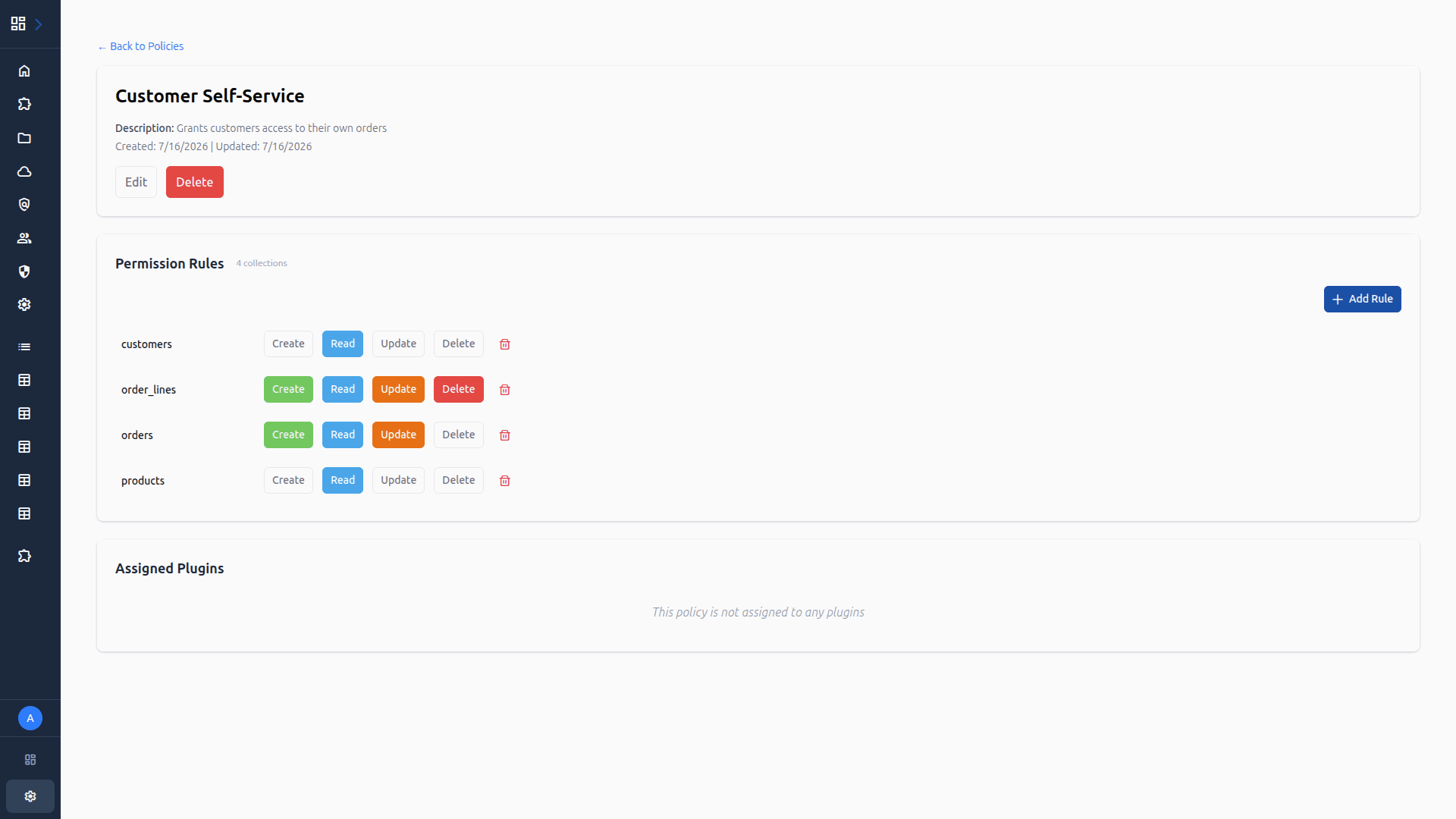
Two-layer authorization: scopes control what plugins or users can access, policies control what data plugins or users can see and edit.
Layer 1: Scopes
Fine-grained API scopes for plugins (items.read, kv.all, db.query, etc.). Wildcard and rootaccess.all support.
Layer 2: Policies
Row-level and field-level permissions with dynamic variables ({user.id}) resolved at query time.
M:M Relationship Traversal
Policy filters traverse many-to-many relationship paths like order_assignments.user.roles.name.
Admin UI
A full-featured admin panel built with Vue 3, PrimeVue, and Tailwind CSS. Served directly by the core - no separate server needed.
Auto-Generated Plugin UI
Plugins declare a settings_schema in manifest.json using JSON Schema. The admin UI renders a settings form automatically.
Plugin Pages
Embed custom pages build with Vue into the admin sidebar. They appear as navigation items automatically without configuration.
Role-Based Menus
Admin sidebar menus are configurable per role. Different roles see different navigation items.
Plugin Architecture
Extend your backend with Docker containers in any language. Each plugin gets its own database schema, API endpoints, and admin UI pages.
Multi-Language SDKs
Python, TypeScript, and Rust SDKs with typed clients, connection pooling, and auto-injected auth headers. Same design across all three.
Database Per Plugin
Each plugin gets its own PostgreSQL schema with migration support (.up.sql / .down.sql). Execute queries through the core's DB proxy with parameterized SQL.
Plugin Scopes
Fine-grained scopes (items.read, kv.all, db.query) control what each plugin can access. Declared in manifest.json, enforced at runtime.
Plugin Manifest
Declare name, version, scopes, settings schema, and admin pages in manifest.json. System plugins auto-deploy on core startup.
Dev Sessions
Skip Docker builds during development. alcedo dev --port 3000 routes plugin traffic to your local dev server with hot reload.
Core Proxy
Requests arrive at /p/:slug/* and are proxied to the plugin container. Auth via X-Request-ID header to Redis to scope check.
Automation Engine
React to changes in your data automatically. Send notifications, sync external services, enforce business rules. All running inside your infrastructure.
Send alerts and notifications
Trigger email, Slack, or webhook notifications when items are created or updated. Stay informed without polling.
Sync with external services
Push data to CRMs, ERPs, or custom APIs automatically. New customer created? Send them to your marketing platform instantly.
Enforce business rules
Flag high-value orders for review, validate data before saving, or update inventory levels when orders are placed.
New order placed
Send confirmation email to customer + notify warehouse team on Slack
Customer updated
Sync changed fields to external CRM + update marketing segments
High-value order detected
Flag for manager review + apply discount if order exceeds $500
Deployment Options
Deploy on Docker Compose for self-hosted production or Kubernetes for scale.
Docker Compose
PostgreSQL 18 + Redis 8
Nginx reverse proxy
System plugin auto-deploy
Kubernetes
K3s manifests included
PVC-based plugin storage
PodDisruptionBudget
Resource limits + non-root containers
Railway
COMING SOONOne-click deploy
Managed databases
Auto-scaling
Zero infrastructure management
Multi-App SupportComing Soon
Create multiple apps within a single AlcedoCore instance. Each app has its own collections, policies, and plugins - but you can reference data across apps when you need to.
Isolated by default
Each app is a self-contained workspace with its own schema and permissions.
Cross-app references
Link collections across apps to share data while maintaining boundaries.
Independent deployment
Deploy, update, and scale each app independently without affecting others.
v2.1.0
Live · Deployed 2h ago
v2.2.0-beta
Staging · Testing new checkout flow
v2.0.0
Previous · Rollback available
Version ManagementComing Soon
Create multiple versions of your apps for development. Test changes in staging, promote to production, and roll back instantly if something goes wrong.
Development workflows
Create staging versions to test changes before deploying to production. No risk of breaking live data.
One-click rollback
Previous versions are preserved. Revert to any prior version instantly if a deployment causes issues.
Parallel development
Multiple teams can work on different versions simultaneously without conflicts.